 By Rahul Vats
 Checking your salary details online has become quick and convenient with the HRMS Odisha Portal. Earlier, employees had to depend on office records or printed slips to understand their earnings. However, now you can access complete salary information anytime with just a few clicks.
Even so, many users still feel confused about where to find salary details and how to view them correctly. Therefore, this guide will explain how to check salary details in HRMS Odisha step by step, along with tips, common issues, and solutions. Moreover, you will learn how to easily read and verify your salary information.
Why Checking Salary Details is Important
Before you begin, understand why regularly checking your salary matters.
Key Reasons:
- Helps verify salary accuracy
- Allows tracking of allowances and deductions
- Useful for financial planning
- Required for loans and documentation
Therefore, regular checks help you stay informed and avoid errors.
What Salary Details Can You Check
HRMS Odisha provides a complete breakdown of your salary.
You Can View:
- Basic pay
- Dearness Allowance (DA)
- House Rent Allowance (HRA)
- Other allowances
- Deductions (PF, tax, etc.)
- Net salary
As a result, you can clearly understand your earnings.
Requirements Before Checking Salary Details
Before starting the process, make sure you have the required details ready.
You Need:
- HRMS ID or Username
- Password
- Registered mobile number (for OTP if required)
- Stable internet connection
In addition, use an updated browser for better performance.
Step-by-Step Guide to Check Salary Details in HRMS Odisha
Now, let’s go through the complete process. Follow each step carefully.
Step 1: Visit the Official HRMS Odisha Portal
First, open your browser and visit the official HRMS Odisha website.
Always use the correct portal to avoid security risks. Once the homepage loads, go to the login section.
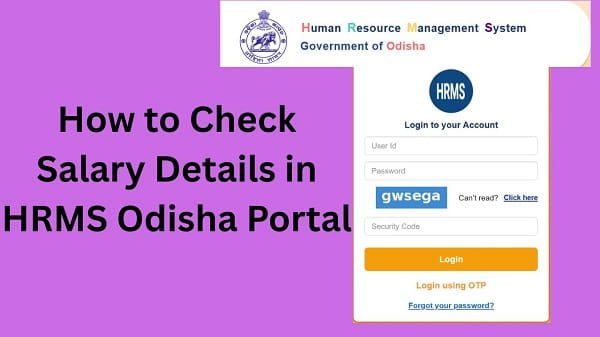
Step 2: Log In to Your Account
Next, enter your login details:
- HRMS ID or Username
- Password
After that, complete OTP verification if required. Then, click on the Login button.
If your details are correct, you will be redirected to your dashboard.
Step 3: Navigate to Payroll Section
After logging in, look for the Payroll or Salary section.
In most cases, this section contains all salary-related services.
Step 4: Select Salary Details Option
Now, click on the Salary Details or Pay Details option.
Then, select:
- Month
- Year
Make sure you choose the correct period.
Step 5: View Salary Breakdown
After selecting the details, click on the View button.
Your salary breakdown will appear on the screen.
You Will See:
- Earnings
- Allowances
- Deductions
- Net salary
Therefore, you can easily review all components.
How to Understand Salary Details
Once you access your salary details, you should know how to read them.
Key Points:
- Basic Pay: Fixed component
- Allowances: Additional benefits
- Deductions: PF, tax, etc.
- Net Salary: Final amount received
As a result, you can clearly understand your income.
What to Do After Checking Salary Details
After reviewing your salary, you should take a few steps.
Recommended Actions:
- Verify all details
- Compare with previous months
- Save or download records
Therefore, you can maintain accurate records.
Common Issues While Checking Salary Details (And Fixes)
Although the process is simple, users sometimes face problems. However, you can easily fix them.
1. Salary Details Not Showing
Solution:
- Ensure salary is processed
- Select the correct month and year
- Refresh the page
2. Unable to Log In
Solution:
- Recheck credentials
- Reset password if needed
3. Page Loading Slowly
Solution:
- Use a stable internet
- Avoid peak hours
4. Incorrect Salary Data
Solution:
- Verify details carefully
- Contact your department
Tips for a Smooth Experience
To avoid issues, follow these simple tips.
Helpful Tips:
- Use a reliable internet connection
- Keep the browser updated
- Avoid multiple login attempts
- Check details carefully
As a result, you can access salary information smoothly.
Importance of Verifying Salary Details
Checking your salary is not enough—you should also verify it.
Why It Matters:
- Ensures accuracy
- Prevents financial errors
- Helps in planning expenses
Therefore, always review your salary carefully.
What to Do If You Cannot Check Salary Details
If you still face issues, you should take further steps.
You Can:
- Contact your department’s HR office
- Verify salary processing status
- Reach out to HRMS Odisha support
They can help resolve the issue quickly.
Conclusion
Checking your salary details on the HRMS Odisha Portal is simple when you follow the correct steps. First, log in to your account, then navigate to the payroll section, select the desired month, and view your salary breakdown.
Moreover, by understanding common issues and applying quick fixes, you can avoid delays. In addition, verifying your salary regularly ensures accuracy and better financial planning.
So, whenever you need to check your salary, use this guide to access your HRMS Odisha salary details quickly and easily.
FAQs
Q1. How can I check my salary details?
A: You can check them from the Payroll section after logging in.
Q2. Is the salary updated every month?
A: Yes, after processing.
Q3. Can I check old salary details?
A: Yes, by selecting previous months.
Q4. Is it safe to check salary online?
A: Yes, if you use the official portal.
Q5. Can I access it on mobile?
A: Yes, you can use a mobile browser.