 By Rahul Vats
 Checking your salary details online has become simple and convenient with the HRMS Bihar Portal. Instead of relying on paperwork or visiting offices, employees can now access complete salary information within minutes. However, many users still feel confused about where to find these details and how to view them properly.
Therefore, this guide will help you understand how to check salary details on the HRMS Bihar portal step by step, along with useful tips, common issues, and solutions. Moreover, you will learn how to access accurate financial data quickly and securely.
What are the salary details on HRMS Bihar?
Before you begin, it is important to understand what salary details include. Unlike a simple salary slip, detailed salary information provides a complete breakdown of your earnings and deductions.
Salary Details Include:
- Basic salary
- Dearness Allowance (DA)
- House Rent Allowance (HRA)
- Other allowances
- Provident Fund (PF) deductions
- Tax deductions
- Net salary
Therefore, checking these details helps you understand your monthly income clearly.
Requirements Before Checking Salary Details
Before you proceed, make sure you have everything ready. Otherwise, you may face delays.
You Need:
- Username or Employee ID
- Password
- Registered mobile number (for OTP if required)
- Stable internet connection
In addition, always use an updated browser to avoid technical issues.
Step-by-Step Guide to Check Salary Details
Now, let’s go through the complete process. Follow each step carefully for a smooth experience.
Step 1: Visit the Official HRMS Bihar Portal
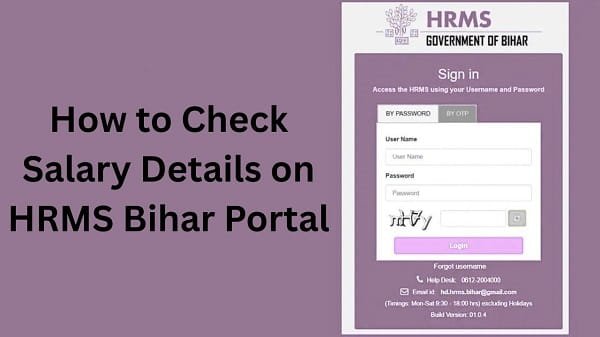
First, open your browser and visit the official HRMS Bihar website. Always ensure that you access the correct portal to protect your data.
Once the homepage loads, you will see the login section.
Step 2: Log In to Your Account
Next, enter your login details:
- Username or Employee ID
- Password
After that, complete OTP verification if required. Then, click on the Login button.
If your details are correct, you will be redirected to your dashboard.
Step 3: Go to the Payroll Section
After logging in, look for the Payroll or Salary section on the dashboard.
In most cases, this section contains all salary-related options, including salary slips and detailed breakdowns.
Step 4: Select Salary Details Option
Now, click the option labeled Salary Details, Pay Details, or similar.
Then, you may need to select:
- Month
- Year
Make sure you choose the correct period to view accurate data.
Step 5: View Salary Breakdown
After selecting the details, click on the View button.
Your complete salary breakdown will appear on the screen. This includes earnings, deductions, and net salary.
Step 6: Download or Save Details
Finally, you can download or print the salary details if needed.
You can:
- Save it as a PDF
- Print it for official use
As a result, you will have a record for future reference.
Benefits of Checking Salary Details Online
Checking salary details through HRMS Bihar offers several advantages.
Key Benefits:
- Instant Access: View details anytime
- Transparency: Clear breakdown of earnings and deductions
- Convenience: No need to visit offices
- Accuracy: Direct system-generated data
- Record Keeping: Easy download and storage
Therefore, the system improves both efficiency and clarity.
Common Issues While Checking Salary Details (And Fixes)
Although the process is simple, users sometimes face problems. However, you can easily fix them.
1. Unable to Log In
This issue often occurs due to incorrect credentials.
Solution:
- Recheck username and password
- Reset password if needed
2. Salary Details Not Showing
Sometimes, no data appears after selecting the month.
Solution:
- Ensure salary has been processed
- Select the correct month and year
3. Page Not Loading
At times, the portal may load slowly.
Solution:
- Clear browser cache
- Use a different browser
- Check the internet connection
4. Incorrect Salary Data
If the data appears incorrect, you should take action.
Solution:
- Contact your department
- Verify records
Tips for Smooth Access
To avoid issues, follow these simple tips.
Helpful Tips:
- Use a stable internet connection
- Avoid peak hours
- Keep your login details secure
- Use updated browsers
As a result, you can check your salary details without interruptions.
Important Uses of Salary Details
Your salary details are useful for many purposes.
You Can Use Them For:
- Financial planning
- Loan applications
- Tax filing
- Income verification
Therefore, you should regularly check your salary details.
What to Do If You Cannot Access Salary Details
If you still face issues, you should take further steps.
You Can:
- Contact your department’s HR office
- Reach out to HRMS Bihar support
They can resolve technical or account-related issues quickly.
FAQs on HRMS Bihar Salary Details
Q1. How can I check my salary details?
Ans: You can check them in the Payroll section after logging into the portal.
Q2. Is salary information updated every month?
Ans: Yes, once the salary is processed, the details are updated.
Q3. Can I download salary details?
Ans: Yes, you can download or print them as needed.
Q4. Why are my salary details not showing?
Ans: This may happen due to an unprocessed salary or incorrect selection.
Q5. Can I access salary details on mobile?
Ans: Yes, you can use a mobile browser to access them.