 By Rahul Vats
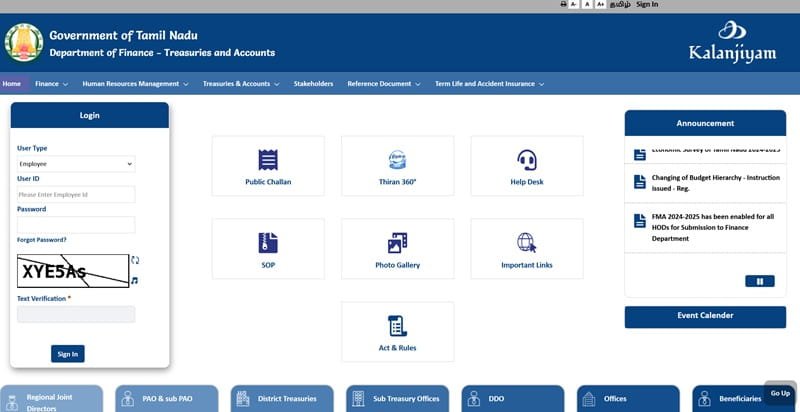
 Managing salaries, pensions, treasury operations, and employee records becomes easier when everything runs through a single, secure digital system. That is exactly what IFHRMS Karuvoolam Tamil Nadu provides. The official portal of the Government of Tamil Nadu helps employees, pensioners, departments, and treasury offices access important finance and HR services online. It reduces paperwork, improves efficiency and enhances transparency across departments.
Earlier, many government processes depended on files, manual approvals, and repeated office visits. However, IFHRMS Karuvoolam modernized the workflow by consolidating payroll, treasury, pension, and employee services onto a single platform. Therefore, this detailed guide explains the IFHRMS Karuvoolam features, functions, services, benefits, uses, and FAQs in a simple, practical format.
Why IFHRMS Karuvoolam is Important
Tamil Nadu handles a large number of employees, pensioners, and financial transactions every month. Because of that, departments need a reliable digital system that can manage data quickly and securely.
IFHRMS Karuvoolam plays an important role because it helps with:
- Centralized payroll processing
- Treasury and accounts management
- Pension disbursement workflows
- Employee self-service access
- Faster approvals
- Better financial transparency
As a result, government offices can work more efficiently while users receive faster services.
Who Uses IFHRMS Karuvoolam?
The portal supports multiple categories of authorized users. Since each group has different needs, the system offers role-based access.
Main Users Include:
- Tamil Nadu Government employees
- Pensioners
- Treasury officials
- Department administrators
- Drawing and Disbursing Officers (DDOs)
- Finance and accounts staff
Therefore, the portal serves both individual users and administrative departments.
Key Features of IFHRMS Karuvoolam
One of the system’s biggest strengths is its all-in-one structure. Instead of using separate portals, users can access many services in one place.
- Secure User Login
The portal provides secure login access for employees, pensioners, and authorized officers. CAPTCHA and authentication layers improve safety.
- Salary and Payroll Management
Departments can process monthly salaries, deductions, arrears, and pay revisions digitally.
- Pension Management
Pension-related services become easier through centralized online workflows.
- e-Challan Services
Users can create challans and make online payments through the official challan system.
- Employee Records Management
Employees can access profile details, service information, and other work-related records.
- Mobile Accessibility
The portal also supports mobile-friendly access, making it easier for users to complete tasks.
As a result, users save time while departments improve efficiency.
Core Functions of IFHRMS Karuvoolam
Features show what the system offers, while functions explain what it handles day to day.
Main Functions:
- Salary bill generation
- Budget monitoring
- Treasury transaction processing
- Pension approval workflows
- Employee data maintenance
- Bill status monitoring
- Department approval routing
- Financial reporting
Therefore, the system supports both HR and finance operations.
Services Available on IFHRMS Karuvoolam
The portal includes practical services that users regularly search for.
Employee Services
Employees commonly use the portal for:
- Payslip download
- Salary statement access
- Profile verification
- Leave-related requests
- Personal data updates
- Service history access
Pensioner Services
Pensioners can use the portal for:
- Pension statement access
- Payment-related information
- Account-related services
Treasury Services
Treasury offices and departments can use services such as:
- Bill token status
- Treasury search
- DDO information
- Bill movement tracking
Public Payment Services
Users can also access:
- e-Challan creation
- Online payment options
- Challan acknowledgment copies
As a result, the portal serves multiple user needs from one platform.
Major Benefits of IFHRMS Karuvoolam
The portal offers clear benefits for both departments and users.
- Saves Time
Users can complete many tasks online instead of visiting offices.
- Better Transparency
Status tracking becomes easier for bills, salaries, and approvals.
- Reduced Paperwork
Digital processes reduce file movement and dependency on printing.
- Faster Processing
Online workflows help speed up salary, pension, and treasury tasks.
- Centralized Data
Departments can manage employee and financial data in a single secure system.
- Better Governance
Real-time systems support accountability and efficient administration.
Therefore, IFHRMS is valuable not only for convenience but also for governance quality.
How to Access and Login IFHRMS Karuvoolam
Using the portal is simple when you follow the correct steps.
Basic Steps:
- Visit the official IFHRMS Karuvoolam portal: https://www.karuvoolam.tn.gov.in/web/tnta/
- Choose the correct user category
- Enter User ID and Password
- Complete CAPTCHA if required
- Verify OTP if prompted
- Open your dashboard
Always use the official website to protect your account and data.
Best Uses for Government Employees
Employees benefit from the portal in several practical ways.
Common Uses:
- Download monthly payslips
- Check salary details
- Review service records
- Access profile information
- Submit requests faster
- Monitor account updates
As a result, employees gain more control over routine tasks.
Best Uses for Pensioners
Pensioners also benefit because the system improves access and reduces dependency on physical visits.
Common Uses:
- Check pension payment details
- Access statements
- Review pension records
- Get digital support faster
Therefore, the portal adds convenience for retired users too.
Common Problems and Quick Fixes
Even well-built systems can create occasional issues. However, most problems are easy to solve.
1. Login Not Working
Fix:
- Check User ID and password
- Clear browser cache
- Retry carefully
2. OTP Not Received
Fix:
- Check the mobile network
- Wait a few minutes
- Retry again
3. Website Loading Slow
Fix:
- Use a stable internet
- Try during non-peak hours
- Refresh page
4. Payslip Not Showing
Fix:
- Select the correct month
- Refresh dashboard
- Wait for processing update
Therefore, most issues can be solved quickly without technical escalation.
Why IFHRMS Has Strong Long-Term Value
Digital systems are now essential for modern administration. IFHRMS Karuvoolam gives Tamil Nadu a scalable platform for employee management and financial governance.
Instead of depending on fragmented systems, departments can work through one connected network. Consequently, response time improves, errors reduce, and service delivery becomes smoother.
Tips for Smooth Portal Usage
To use the portal efficiently, follow these simple tips.
Helpful Tips:
- Keep login details secure
- Use updated browser versions
- Check records regularly
- Download documents monthly
- Avoid multiple wrong login attempts
- Use only official links
As a result, your experience remains smooth and secure.
Conclusion
IFHRMS Karuvoolam is one of the most important digital governance platforms for Tamil Nadu. It combines payroll, treasury, pension, challan, and employee services into one efficient system.
Moreover, it saves time, improves transparency, reduces paperwork, and speeds up official processes. In addition, employees and pensioners benefit from convenient self-service access.
So, if you need salary records, treasury tools, pension services, or employee support, IFHRMS Karuvoolam remains the official and reliable solution for Tamil Nadu government users.
FAQs on IFHRMS Karuvoolam
Q1. What does IFHRMS stand for?
It stands for Integrated Financial and Human Resource Management System.
Q2. Who can use IFHRMS Karuvoolam?
Government employees, pensioners, treasury staff, and authorized department users.
Q3. Can employees download payslips?
Yes, eligible users can access salary-related services after login.
Q4. Is pension service available?
Yes, pension-related services are supported on the portal.
Q5. What is e-Challan in Karuvoolam?
It is the online challan and payment system available through the portal.
Q5. What should I do if the login fails?
Check credentials, clear browser cache, and retry later.
Q6. Is the portal useful for pensioners?
Yes, pensioners can access statements and related services online.
Q7. Can I use the portal on mobile?
Yes, the portal supports mobile access.