 By Rahul Vats
 Managing salary details has become much easier with the HRMS Bihar Portal. Instead of visiting offices or requesting printed documents, employees can now download their salary slips online within minutes. However, many users still feel confused about the exact steps, especially when using the portal for the first time.
Therefore, this complete guide will help you download your HRMS Bihar salary slip online step by step, along with useful tips, common issues, and solutions. Moreover, you will learn how to access your salary information quickly and securely.
What is HRMS Bihar Salary Slip?
Before you proceed, it is important to understand what a salary slip includes. A salary slip is an official document that provides detailed information about your monthly earnings and deductions.
It Usually Includes:
- Basic salary
- Allowances (HRA, DA, etc.)
- Deductions (PF, tax, etc.)
- Net salary
Therefore, it serves as an important financial document for employees.
Requirements Before Downloading Salary Slip
Before you start the process, make sure you have the necessary details ready. Otherwise, you may face delays.
You Need:
- Username or Employee ID
- Password
- Registered mobile number (for OTP if required)
- Stable internet connection
In addition, use an updated browser to avoid technical issues.
Step-by-Step Guide to Download HRMS Bihar Salary Slip
Now, let’s go through the complete process. Follow each step carefully.
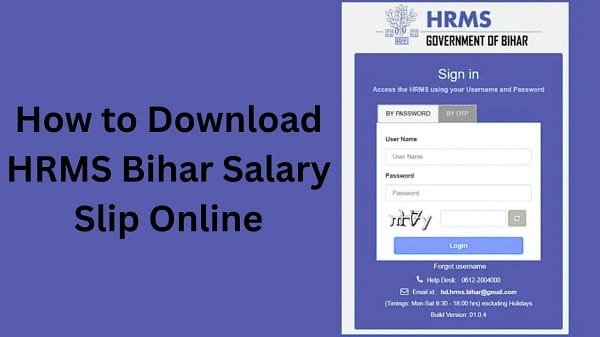
Step 1: Visit the Official HRMS Bihar Portal
First, open your browser and visit the official HRMS Bihar website. Always ensure you are using the correct website to protect your data.
Once the homepage loads, you will see the login section.
Step 2: Log In to Your Account
Next, enter your:
- Username or Employee ID
- Password
After that, complete OTP verification if required. Then, click on the Login button.
If your details are correct, you will be able to access your dashboard.
Step 3: Navigate to Payroll Section
After logging in, look for the Payroll or Salary section on the dashboard.
In most cases, this section contains options related to salary slips and payment details.
Step 4: Select Salary Slip Option
Now, click on the Salary Slip or Pay Slip option.
Then, you will need to select:
- Month
- Year
Make sure you choose the correct period for which you want the salary slip.
Step 5: View Salary Slip
After selecting the details, click on the View button.
Your salary slip will appear on the screen with complete details of earnings and deductions.
Step 6: Download or Print Salary Slip
Finally, click on the Download or Print option.
You can:
- Save the file as a PDF
- Print it for official use
As a result, you will have a copy of your salary slip ready for future use.
Benefits of Downloading Salary Slip Online
Downloading your salary slip through HRMS Bihar offers several advantages.
Key Benefits:
- Time-Saving: You don’t need to visit offices
- Easy Access: Available anytime, anywhere
- Secure: Protected through login credentials
- Instant Download: No waiting required
- Accurate Records: Direct data from the system
Therefore, the online system improves convenience and efficiency.
Common Issues While Downloading Salary Slip (And Fixes)
Although the process is simple, users sometimes face problems. However, you can easily fix them.
1. Unable to Log In
This issue often occurs due to incorrect credentials.
Solution:
- Recheck your username and password
- Reset your password if needed
2. Salary Slip Not Showing
Sometimes, the selected month may not display any data.
Solution:
- Ensure you selected the correct month and year
- Check if the salary has been processed
3. Page Not Loading
At times, the portal may load slowly.
Solution:
- Clear browser cache
- Switch to another browser
- Check the internet connection
4. Download Button Not Working
This issue may occur due to browser restrictions.
Solution:
- Enable pop-ups
- Try a different browser
- Update your browser
Tips for Smooth Salary Slip Download
To avoid issues, follow these simple tips.
Helpful Tips:
- Use a stable internet connection
- Avoid peak hours
- Keep your login details secure
- Use updated browsers
As a result, you can download your salary slip without interruptions.
Important Uses of a Salary Slip
Your salary slip is not just a document—it serves multiple purposes.
You Can Use It For:
- Applying for loans
- Filing income tax returns
- Proof of employment
- Financial planning
Therefore, you should always keep your salary slips सुरक्षित and organized.
What to Do If You Cannot Download a Salary Slip
If you still face issues, you should take further steps.
You Can:
- Contact your department’s HR office
- Reach out to HRMS Bihar support
They can help resolve technical or account-related problems quickly.
FAQs on HRMS Bihar Salary Slip
Q1. How can I download my salary slip?
Ans: You can download it from the Payroll section after logging into the portal.
Q2. Is the salary slip available every month?
Ans: Yes, once your salary is processed, the slip becomes available.
Q3. Can I download salary slips for previous months?
Ans: Yes, you can select any month and year to download past slips.
Q4. Is it safe to download salary slips online?
Ans: Yes, as long as you use the official HRMS Bihar portal.
Q5. Can I access salary slips on mobile?
Ans: Yes, you can use your mobile browser to download them.