 By Rahul Vats
 Accessing salary records, payslips, pension details, and employee services becomes simple when you know the correct login process. The IFHRMS Tamil Nadu Portal, also known as Karuvoolam, helps government employees, pensioners, and authorized users manage important services online. Instead of visiting offices for routine work, users can complete many tasks directly through the portal.
Earlier, many people depended on manual systems. However, the IFHRMS platform now offers a faster and more transparent method. Therefore, this guide explains how to log in to the IFHRMS Tamil Nadu Portal step by step, along with requirements, common issues, solutions, and useful tips. Moreover, if you follow these instructions carefully, you can access your account without confusion.
Why the IFHRMS Login is Important
Before learning the steps, you should understand why logging in matters.
Main Benefits:
- Access salary slips quickly
- View service records easily
- Check pension details online
- Manage employee services faster
- Save time and effort
Therefore, regular access to your account helps you handle important tasks smoothly.
Who Can Log in to the IFHRMS Portal?
The portal supports different user categories. Therefore, only authorized users should access it.
Eligible Users:
- Tamil Nadu Government employees
- Pensioners
- Treasury officials
- Department users
- Finance and accounts staff
As a result, different users receive role-based access.
Requirements Before Login
Before starting the login process, keep these details ready.
You Need:
- User ID or Employee ID
- Password
- Registered mobile number
- Stable internet connection
- Updated browser
In addition, keep your mobile nearby because OTP verification may appear.
Step-by-Step Guide to Logging in to the IFHRMS Tamil Nadu Portal
Now, let’s go through the complete process carefully.
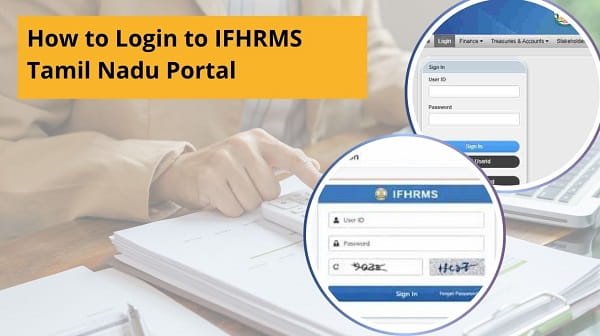
Step 1: Visit the Official IFHRMS Website
First, open your browser and visit the official IFHRMS Tamil Nadu portal.
Always use the official website. Otherwise, fake links may create security risks.
Step 2: Select the Login Section
After the homepage opens, locate the login area.
Usually, the portal clearly displays user login options. Therefore, choose the correct category if multiple options appear.
Step 3: Enter User ID
Next, type your User ID, Employee ID, or allotted login credentials in the required field.
However, make sure you enter it correctly because small mistakes may block access.
Step 4: Enter Password
After that, type your password carefully.
Helpful Tips:
- Check Caps Lock status
- Avoid extra spaces
- Type slowly and accurately
Therefore, careful entry reduces login errors.
Step 5: Enter CAPTCHA Code
Many times, the portal asks for CAPTCHA verification.
So, enter the displayed code exactly as shown. If unclear, refresh the code and try again.
Step 6: Complete OTP Verification
Sometimes, the system sends an OTP to your registered mobile number.
Then:
- Check your SMS inbox
- Enter OTP correctly
- Submit within the time limit
As a result, the system verifies your identity.
Step 7: Click the Login Button
Finally, click on the Login button.
If all details are correct, your dashboard will open successfully.
Therefore, you can now access services such as payslips, pensions, salaries, and records.
What You Can Access After Login
Once logged in, several services become available.
Common Dashboard Services:
- Payslip download
- Salary statement
- Pension details
- Employee records
- Profile updates
- Department’s Logos
As a result, a single login grants access to multiple tools.
Common IFHRMS Login Problems and Fixes
Although the process is simple, users sometimes face issues. However, most problems are easy to solve.
1. Invalid Credentials Error
Fix:
- Recheck User ID
- Re-enter password
- Reset password if needed
2. OTP Not Received
Fix:
- Check the network signal
- Wait for a minute
- Request OTP again
3. Website Not Opening
Fix:
- Check the internet connection
- Refresh page
- Try another browser
4. Account Locked
Fix:
- Wait for some time
- Use the forgot password option
- Contact support if required
5. Slow Login Page
Fix:
- Use a stable internet
- Clear browser cache
- Retry later
Tips for Smooth IFHRMS Login
To avoid repeated problems, follow these simple tips.
Helpful Tips:
- Save the official website bookmark
- Use an updated browser
- Keep the password secure
- Avoid repeated wrong attempts
- Log in during non-peak hours
- Keep your mobile number active
Therefore, these habits improve your login experience.
Common Mistakes You Should Avoid
Many users create login issues unknowingly.
Avoid These Errors:
- Using the wrong website link
- Entering an outdated password
- Ignoring CAPTCHA
- Typing OTP incorrectly
- Sharing login details with others
As a result, careful usage keeps your account secure.
Log in to DLogin. You still cannot log in
If the login still fails after trying all fixes, take the next step.
You Can:
- Contact department administrator
- Reach treasury support, team
- Use official helpdesk channels
- Verify your registered mobile number
Therefore, authorized support can resolve account-specific issues quickly.
Why IFHRMS Login Matters for Employees
A working login saves time every month. Moreover, it helps users check salary details, download documents, and instantly track records. In addition, employees no longer need to depend on manual office processes for simple tasks.
Therefore, knowing the correct login method is highly useful.
Conclusion
Logging in to the IFHRMS Tamil Nadu Portal is simple when you follow the correct steps. First, visit the official website, then enter your User ID and password, complete verification, and access your dashboard.
Moreover, if you understand common problems and their fixes, you can avoid delays. In addition, regular login helps you manage salary, pension, and service records efficiently.
So, use this complLoginuide whenever you need to log in to IFHRMS Tamil Nadu quickly and safely.
FAQs on IFHRLoginmil Nadu Login
Q: Who can log in to the IFHRMS Portal?
Government employees, pensioners, and authorized users.
Q: What if I forget my password?
Use the forgot password option.
Q: Why am I not receiving OTP?
Usually, network delays or incorrect mobile registration cause it.
Q: Can I log in on mobile?
Yes, you can use a mobile browser.
Q: Is the IFHRMS login secure?
Yes, especially with password and OTP verification.