 By Rahul Vats
 Accessing your monthly pay slip has become faster and more convenient with the HRMS Odisha Portal. In earlier times, employees depended on office staff or printed copies to check salary details. However, now you can download your pay slip online in just a few minutes.
Even so, many users still feel confused about the latest method, especially with updates in the portal. Therefore, this guide explains how to download the HRMS Odisha pay slip PDF using the latest method in 2026, along with tips, common issues, and quick solutions. Moreover, you will learn how to manage your salary records efficiently.
What is HRMS Odisha Pay Slip?
Before you begin, it is important to understand what a pay slip contains. A pay slip is an official document that shows your monthly salary breakdown.
It Includes:
- Basic salary
- Dearness Allowance (DA)
- House Rent Allowance (HRA)
- Other allowances
- Deductions (PF, tax, etc.)
- Net salary
Therefore, it serves as proof of income and supports financial planning.
Why You Should Download Pay Slip PDF
Downloading your pay slip in PDF format offers several benefits.
Key Benefits:
- Easy digital storage
- Quick access anytime
- Useful for loans and verification
- Secure and tamper-resistant
- Convenient sharing
As a result, maintaining digital copies becomes essential.
Requirements Before Downloading Pay Slip
Before starting the process, make sure you have the required details ready.
You Need:
- HRMS ID or Username
- Password
- Registered mobile number (for OTP if required)
- Stable internet connection
In addition, use an updated browser for better performance.
Step-by-Step Guide to Download HRMS Odisha Pay Slip (2026)
Now, let’s go through the latest process. Follow each step carefully.
Step 1: Visit the Official HRMS Odisha Portal
First, open your browser and visit the official HRMS Odisha website.
Always use the correct portal to avoid security risks. Once the homepage loads, go to the login section.
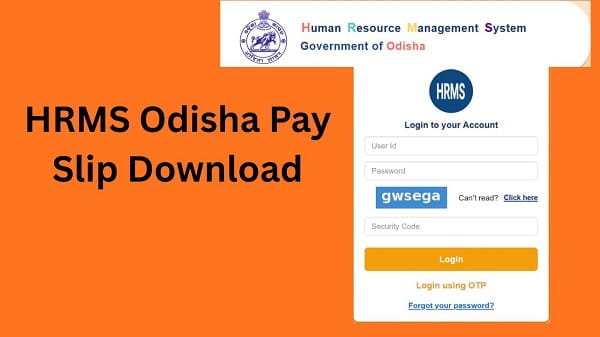
Step 2: Log In to Your Account
Next, enter your login details:
- HRMS ID or Username
- Password
After that, complete OTP verification if required. Then, click on the Login button.
If your details are correct, you will be able to access your dashboard.
Step 3: Go to the Payroll Section
After logging in, navigate to the Payroll or Salary section.
In most cases, this section contains all salary-related options.
Step 4: Select Pay Slip Option
Now, click on the Pay Slip or Salary Slip option.
Then, select:
- Month
- Year
Make sure you choose the correct period.
Step 5: View Pay Slip
After selecting the details, click on the View button.
Your pay slip will appear on the screen with complete salary information.
Step 6: Download Pay Slip PDF
Finally, click on the Download PDF or Print option.
You can:
- Save the file as a PDF
- Print it if required
As a result, your pay slip will be ready for use.
What to Do After Downloading a Pay Slip
After downloading your pay slip, you should take a few steps.
Recommended Actions:
- Save the file in a secure location
- Keep backups for future use
- Verify details for accuracy
Therefore, you can manage your records effectively.
Common Issues While Downloading Pay Slip (And Fixes)
Although the process is simple, users sometimes face problems. However, you can easily fix them.
1. Pay Slip Not Showing
Solution:
- Ensure salary is processed
- Select the correct month and year
- Refresh the page
2. Unable to Log In
Solution:
- Recheck credentials
- Reset password if needed
3. Download Button Not Working
Solution:
- Enable pop-ups
- Update browser
- Try another browser
4. Slow Loading Issue
Solution:
- Use a stable internet
- Avoid peak hours
Tips for Smooth Pay Slip Download
To avoid issues, follow these simple tips.
Helpful Tips:
- Use a reliable internet connection
- Keep your browser updated
- Avoid multiple login attempts
- Save files properly
As a result, the process becomes quick and hassle-free.
Important Uses of Pay Slip
Your pay slip is an important financial document.
You Can Use It For:
- Loan applications
- Income proof
- Tax filing
- Employment verification
Therefore, you should keep it safe.
What to Do If You Cannot Download a Pay Slip
If you still face issues, you should take further steps.
You Can:
- Contact your department’s HR office
- Verify salary processing status
- Reach out to HRMS Odisha support
They can help resolve the issue quickly.
FAQs on HRMS Odisha Pay Slip Download
Q1. How can I download my pay slip?
Ans: You can download it from the payroll section after logging in.
Q2. Is a pay slip available every month?
Ans: Yes, after salary processing.
Q3. Can I download old pay slips?
Ans: Yes, by selecting previous months.
Q4. Is it safe to download pay slips?
Ans: Yes, if you use the official portal.
Q5. Can I use a mobile to download a pay slip?
Ans: Yes, you can use a mobile browser.
Conclusion
Downloading your pay slip PDF from the HRMS Odisha Portal is simple when you follow the latest method. First, log in to your account, then navigate to the payroll section, select the desired month, and download the file.
Moreover, by understanding common issues and applying quick fixes, you can avoid delays. In addition, following best practices ensures a smooth and secure experience.
Whenever you need your salary details, use this guide to quickly and easily download your HRMS Odisha pay slip.